 Some weeks ago I bought a Nokia 6600 smart phone, great mobile with symbian OS. Since then I’ve been playing around with it and discovering how great this operational system is, BlueTooth, IR, Java and the MMC memory card. So I decided to write this article showing 7 cool things you can do with It.
Moblogging:
-
The word Moblog comes from mobile and blog. This is quite a common thing lately, you are on a trip, going to school, well, anywhere you have signal on your mobile, you take a great picture and you don’t want to wait to go home, put it on your computer, then send the picture to a specific email address, and then it will automatically be uploaded to some website you’ve configured. The two famous moblogging hosts are Flickr and TextAmerica. On these websites you can upload a picture with tags and titles. At TextAmerica, you can upload videos too. Both services have paid subscriptions or you can have a free account with many restrictions. I’m starting my moblog but I don’t have many pictures uet. To integrate with my website, I have placed a flickr slideshow showing only pictures with “cameraphone” tags, and it works great. If you know more about the moblogging option, please let me know!
Instant messaging:
 For those who can’t stay away from ICQ or more common lately MSN, there is a great program called Agile Messenger, that allows you to connect to MSN, ICQ, Yahoo and AOL through GPRS. I’ve been using this software for a while now, it works very well, and you can buy GPRS plans for cheap and just leave the program running in your background. It’s great!
Using your cellphone as a webcam:

I had heard about using a symbian phone as a webcam but it was bit complicated, and you needed a bunch of different programs. However, the guys from Warelex made a program to make the job easy using your USB BlueTooth. The program is great and works with any Windows application that can receive video feeds from a web camera including Skype 2.0, MSN and others. You can give it a try or buy it by clicking here.
Tune your guitar:
 There is a little program called GuitarTuner and it’s an interactive guitar tuner software designed exclusively for the Series 60 platform. The built-in microphone of the device is used to record and analyze any sound that can be heard, and the detected pitch is displayed in real-time. I’ve tested this software and it’s a little slow, but it’s very handy to have a guitar tuner wherever you go. You can try it here.
Office on your smart phone:
 If you deal with Microsoft Word, Excel and Powerpoint a lot then this is for you. With this program you can open, view, edit and print your documents. The only thing is that using such software on a smartphone is not the same as on a PC, laptop or even a traditional PDA. Series 60 smartphones, by their very nature, have small screens and limited input capability. There will be limited amounts of data entry, especially in spreadsheets set up to keep track of records, notes or expenses, but actual amounts of data entered are going to be small. The principal use is going to be viewing files on the move. The PC is never going to be that far away and so the key is to have an easy way to get files on the phone, good viewing functions and edit functions that allow for limited data entry while on the phone. The price is a little expensive too, $50. But anyway, it’s a good try!!! You can try it HERE.
Watching movies:
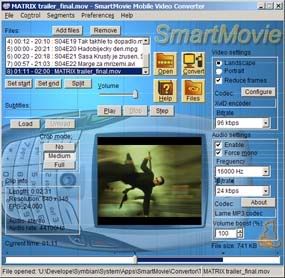
 This is one of the things I like most on mu symbian phone: the ability to watch movies or small videoclips. There is a good program called SmartMovie, that consists of 3 things, a XviD codec, a video converter, and a player on the phone. It works like this: you convert any video file on your PC into a phone-friendly video file. The file gets quite small to fit the size of the phone’s screen. You upload the video onto the device or memory card and then play the video in SmartMovie Player installed on your mobile device. It plays standard AVI format allowing you to preview converted files on your PC and uses popular XviD video codec, which increases compatibility with other video players. The player uses the phone screen in portrait or landscape mode, utilizing the full screen size of the device.The PC converter allows you to split the video file into multiple segments, so that it fits onto your memory card so if you cannot get the entire movie you can cut it into parts and then watch your favorite video in parts, e.g. while traveling to work/school. The mobile player, which supports subtitles, allows you to watch movies in different languages. The friendly PC converter allows you to preview videos on a PC, select parts you want to convert, and alter quality parameters for video and audio streams, allowing you to tune the video to your needs.
You can try this program here.
Playing Nes, Gameboy And Megadrive
-
Playing games like Frozen Bubble is cool, but nothing compares to playing classics of the consoles on your smartphone. I was playing Sonic, Final Fantasy and other games, it’s one of the coolest things on symbian OS.
 For Nintendo there are two emulators, YewNes and Vnes. I chose YewNes, it works pretty well, you can play in full screen mode, open .zip files, there are different speed levels, configurable controls and a bunch of other features. The only problem is that it costs $15, but that’s not much anyways.
 For Sega Mega Drive (or Genesis), there is the PicoDriver emulator with a bunch of features, such as: landscape and portrait screen mode, configurable controls, save/load state, sound and ROM search on full mobile.
 For GameBoy, there is GoBoy, another very good emulator, with features like full sound support, configurable key support, run games directly from your inbox or from the memory card, and play games from .zip.
All the emulators are a great try.